
CLOCK-SAT V1: Designing an E-Ink Desk Clock UI in Lopaka
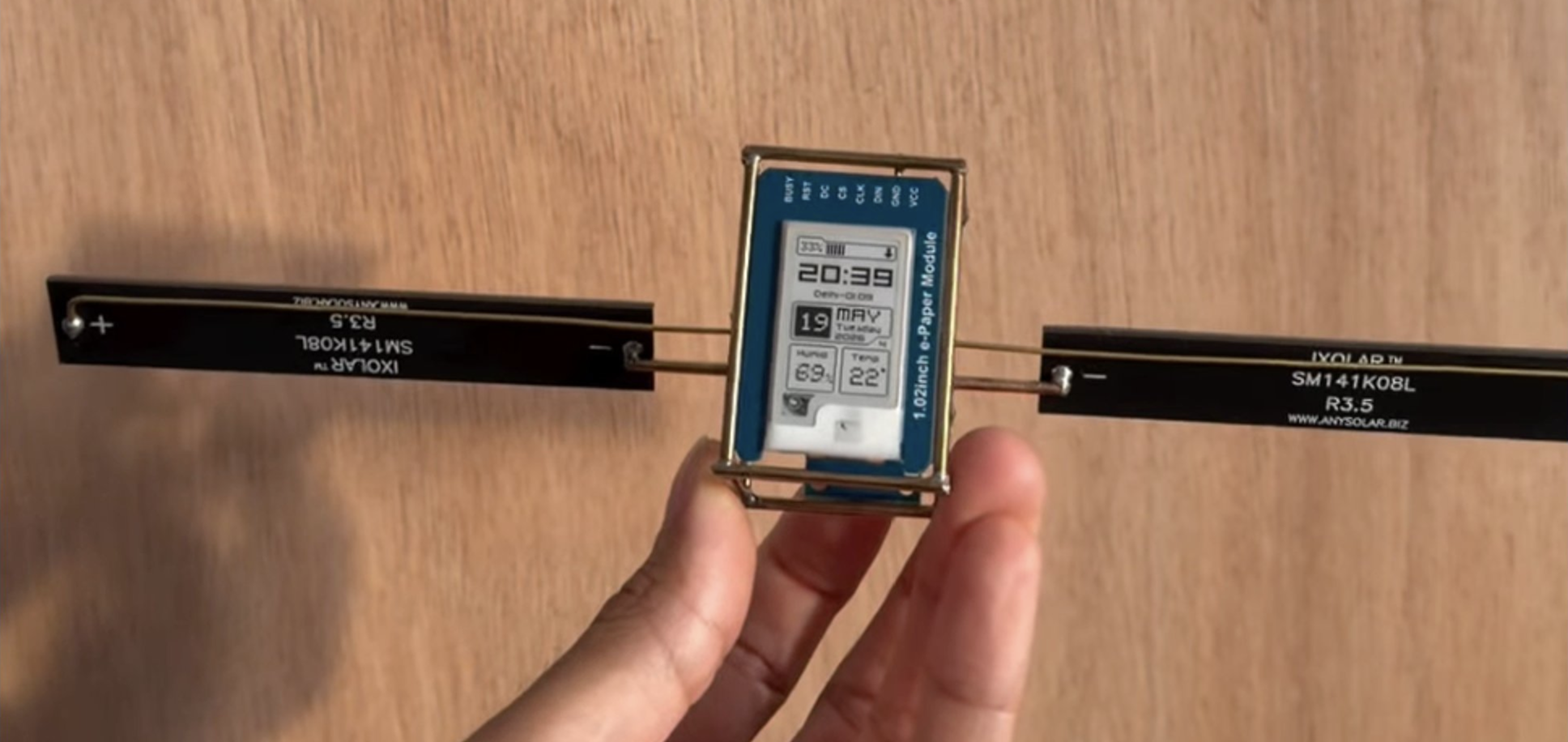
The device
CLOCK-SAT V1 is a desk clock by Maxime Loiseau, though "desk clock" really undersells it. A 1.02-inch e-paper module floats inside a slim brass wireframe with little solar-cell wings, so the whole thing reads like a tiny satellite that drifted onto your desk. It tells the time, the date, and the room's humidity and temperature, then tucks itself into a "sleeping" screen once the lights go out.
Why it's fun to pull apart: the display is all hand-placed pixel art (every digit, label, and icon), and the entire UI was built in Lopaka.
The screen
It's a 1.02-inch e-paper panel: 80x128 pixels, one bit each, pure black and white, driven by GxEPD2. E-ink plays by two rules. There's no greyscale or fades to hide behind, so your layout has to land hard in black and white. But it holds a picture at zero power, and that's the whole trick behind the night screen: the clock stops refreshing, the panel keeps showing the last frame, and the battery barely notices.
CLOCK-SAT has three screens:
- Clock. Large time, a location line, a date block, and humidity/temperature cards.
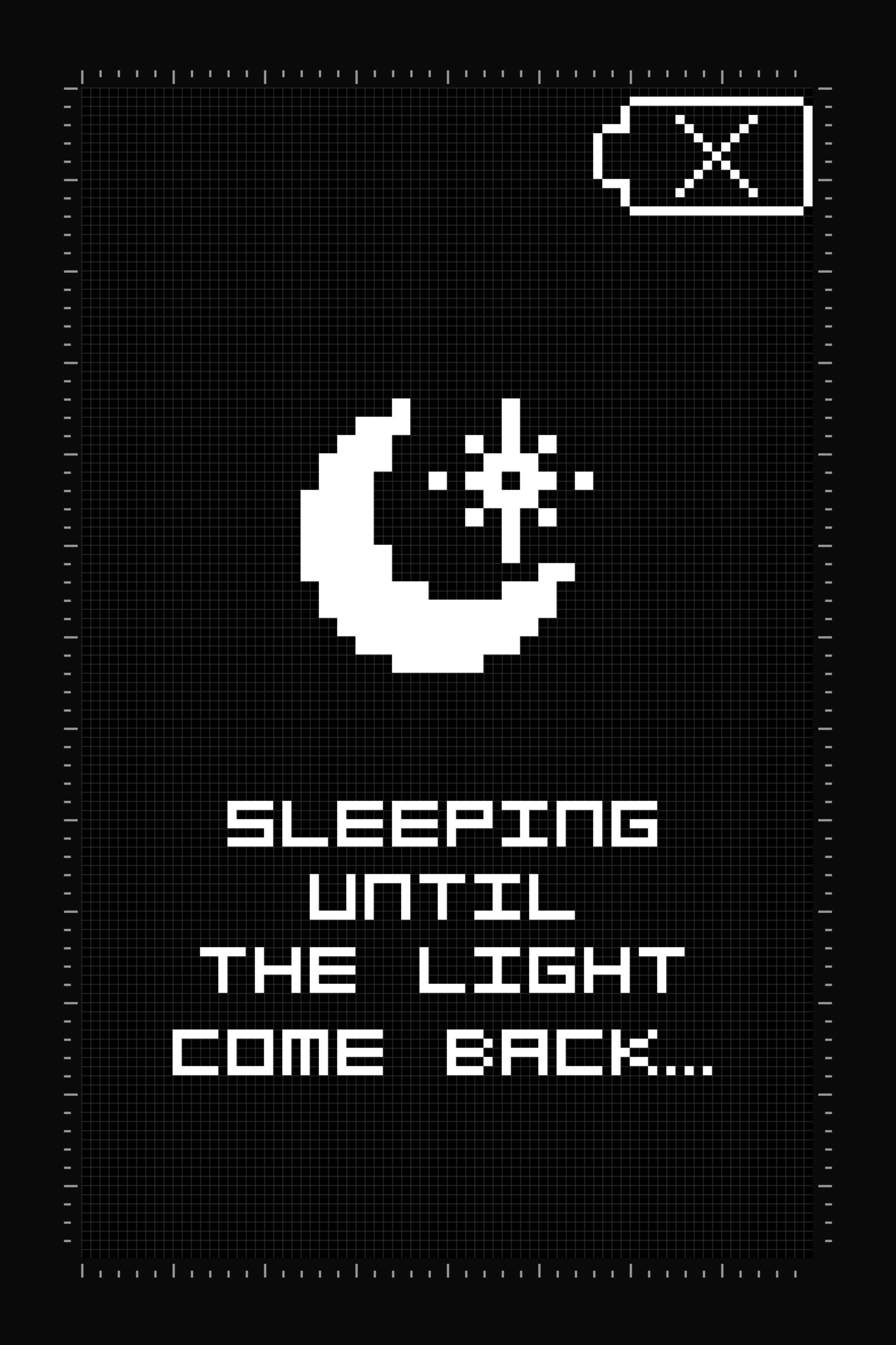
- Sleeping. A moon icon with "Sleeping until the light come back..."
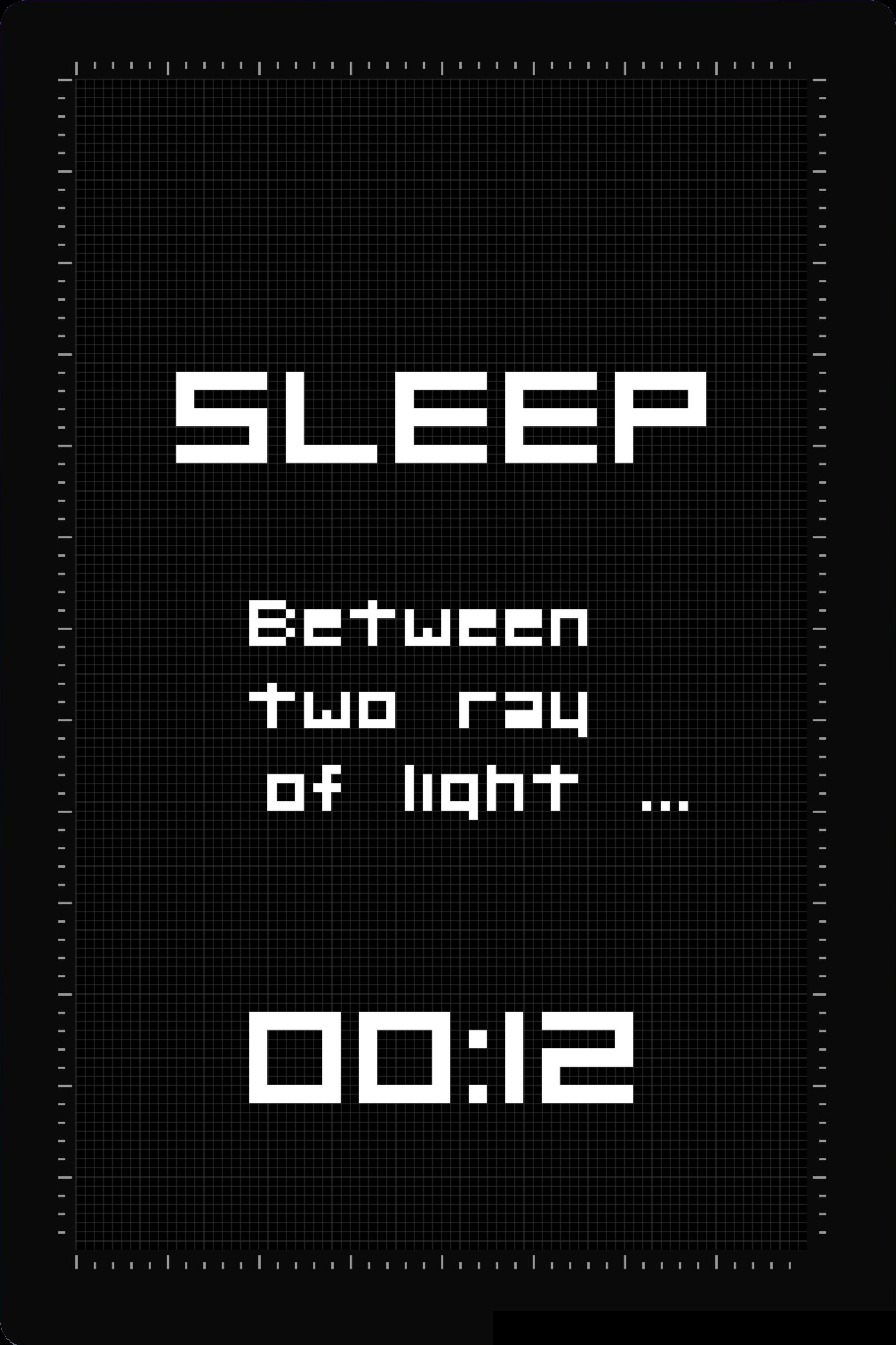
- Sleep countdown. "Sleep between two ray of light..." with a time remaining.
We'll rebuild Screen 1 step by step. The other two are the same trick with different pixels.
Designing it in Lopaka
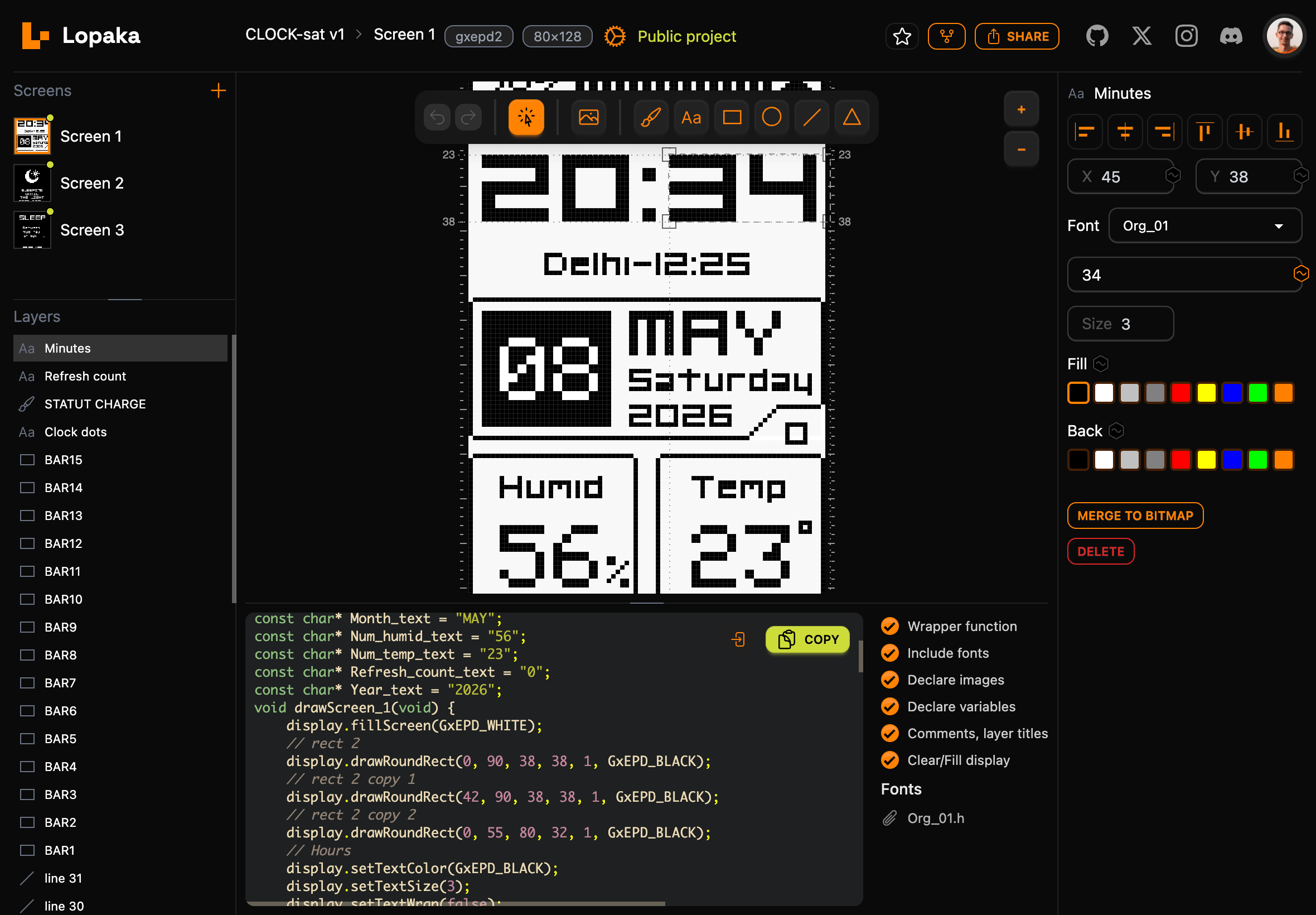
Here's the one idea that matters: the screen is full of live data (time, date, weather), so you're not typing in final values, you're placing fields and wiring the changing ones to variables. Click a text element, hit the make-variable button in the inspector, and the value turns into a placeholder that becomes a variable in the exported code, ready for your firmware to drop the real number in at runtime. So treat every sample value below as a stand-in.
- New project. Open lopaka.app, create a project, choose GxEPD2 as the library and 80 x 128 as the display size.
- Time. Add a large text label at the top in the Org_01 GFX font (the heavy pixel digits; import it under the font settings). The time updates every minute, so make this value a variable instead of fixed text.
- Location line. Add a smaller label under the time for the location and offset, also a variable.
- Date block. Add a filled rectangle as the date card, a large day number, and three stacked labels next to it: month, weekday, and year. These come from your RTC, so make each one a variable.
- Sensor cards. Add a horizontal divider line, then split the bottom into two cards, humidity and temperature. Each has a fixed title label and a variable value below it. A vertical line between them keeps the split clean.
- Screen 2 and 3. Two more screens. Screen 2 is a crescent moon over a wrapped line of text, and you don't have to draw the moon dot by dot: Lopaka's icon library has one ready to drop in. Screen 3 is the same recipe: a heading, a line, and a countdown value (a variable, naturally).
No colors to wrangle, so the whole game is position, size, font, and deciding which values are variables.
Both sleep screens are just an icon and some text. Same building blocks, different mood:
The code
Hit Export, pick GxEPD2 / Adafruit_GFX, and Lopaka spits out the draw calls, bundles the Org_01 font, and pulls every value you marked into its own variable you can set from your firmware. Want the real, full thing? Grab it straight from the project: CLOCK-SAT V1 on Lopaka.
Here's the real export, trimmed for reading. The repeated font include is deduped and the fifteen identical battery-bar rects are cut, but every call is exactly what Lopaka generated:
#include "Org_01.h"

// pixel-art bitmaps
static const unsigned char PROGMEM image_POINT_DEGR__bits[] = {0xe0,0xa0,0xe0};
static const unsigned char PROGMEM image_STATUT_CHARGE_bits[] = {0x10,0x38,0x7c,0xfe,0x38,0x38,0x38,0x38,0x38};

// the values you marked as variables; your firmware sets these
const char* CHARGE___text  = "78%";
const char* Clock_2_text   = "Delhi-12:25";
const char* Date_text      = "08";
const char* Day_text       = "Saturday";
const char* Hours_text     = "20";
const char* Minutes_text   = "34";
const char* Month_text     = "MAY";
const char* Num_humid_text = "56";
const char* Num_temp_text  = "23";
const char* Year_text      = "2026";

void drawScreen_1(void) {
    display.fillScreen(GxEPD_WHITE);

    // hours : minutes, in the Org_01 pixel font
    display.setTextColor(GxEPD_BLACK);
    display.setTextSize(3);
    display.setFont(&Org_01);
    display.setCursor(3, 35);  display.print(Hours_text);
    display.setCursor(39, 35); display.print(":");
    display.setCursor(45, 35); display.print(Minutes_text);

    // location line + date card + sensor cards
    display.setTextSize(1);
    display.setCursor(17, 49); display.print(Clock_2_text);
    display.fillRect(3, 58, 29, 26, GxEPD_BLACK);
    display.setTextColor(GxEPD_WHITE);
    display.setTextSize(2);  display.setFont();
    display.setCursor(7, 78); display.print(Date_text);
    // ...month, weekday, year, Humid/Temp values, battery bar...

    display.display();
}
Drop that function into your GxEPD2 draw loop, hand it your live values, and the thing you nudged around in a browser tab shows up on the panel.
Result
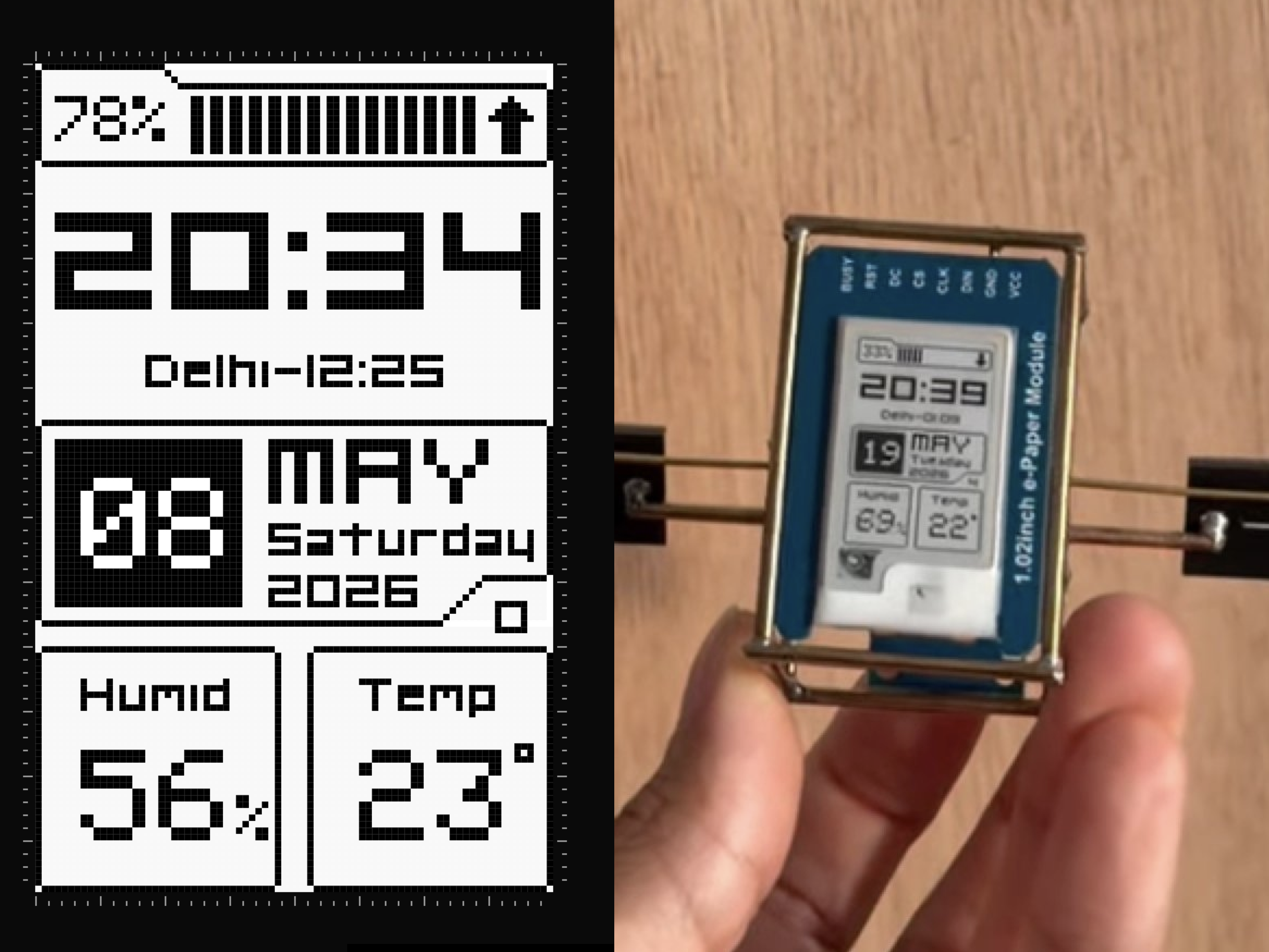
Same pixels, browser to brass frame.
Try it
Making a project is free and runs right in your browser, no install, just lopaka.app and a blank GxEPD2 canvas. Want to fork CLOCK-SAT itself? It's parked in the gallery (a quick signup gets you in). And have a poke around while you're there: Lopaka's grown a big icon library, animations, and a whole pile of other toys since this little clock was built.
Credits
CLOCK-SAT V1 by Maxime Loiseau (@maxime_loiseau_labs, reel). Designed in Lopaka, exported to GxEPD2.