
Draw Your Own Animations: The Summer Update
In May I shipped the animation library. The first question everyone asked was whether they could make their own. Now you can. Here is what landed since then.
Frame animation editor
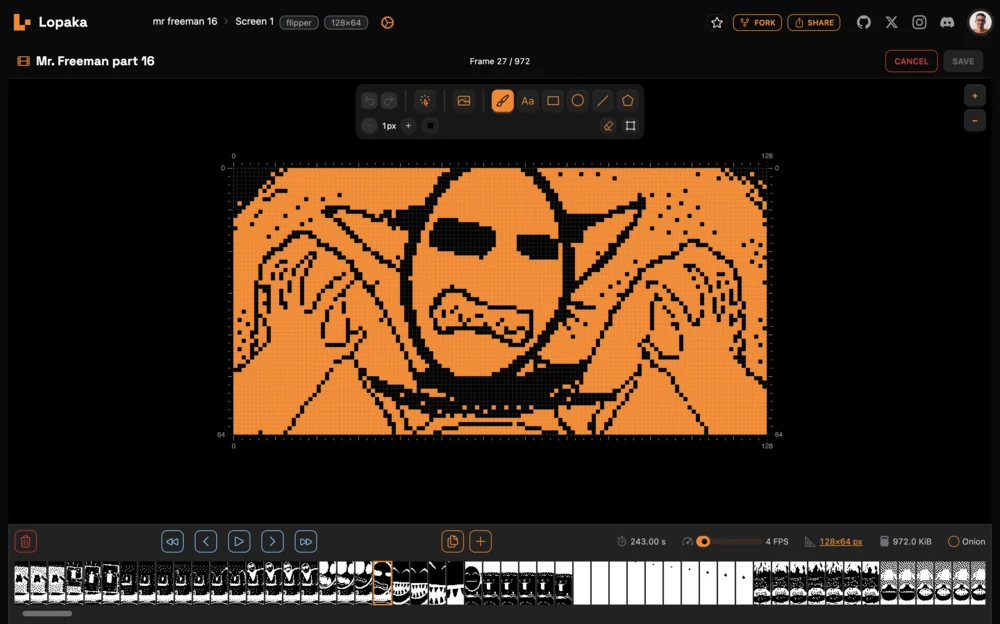
Double-click an animation layer, or hit Edit in the inspector. The canvas becomes a frame editor with the standard Lopaka toolbar, Paint tool, zoom, and shortcuts.
Each frame is a monochrome bitmap. Paint directly on it, or place a rectangle, circle, line, text, or image layer — it flattens into the frame when you move on.
Timeline:
- Drag to reorder
- Option/Alt + drag copies a frame instead of moving it
- Duplicate frame inserts a copy after the selected one
- Add and delete frames
- The strip follows the playhead
Playback and editing:
- Space plays and pauses
- Onion skin shows the previous frame as a 35% ghost behind the current one
- Set the frame rate from 1 to 60 frames per second
- Resize the animation canvas at any point
- Animation size is limited to 5 MiB
Video and GIF import
Drop an MP4, MOV, or WebM into the Image Wizard to sample it into an animation:
- 10 frames are shown for preview
- Set the output frame rate before importing
- Limits: 1,000 frames and 5 MiB
Animated GIFs now have an Animation / Frames switch beside Import. Animation gives you one layer with the full sequence and the GIF's own timing; Frames is the old per-layer behavior. Animation is the default.
Two new dithering algorithms give you better monochrome conversion for different sources. Atkinson keeps small displays readable by dropping mid-tone noise, and Bayer 8x8 produces a regular pattern instead of scattered pixels — useful for backgrounds and fills where Floyd-Steinberg looks dirty.
Resampling dropped the modes that produced worse results than the default. High quality shrinks photos and detailed art without losing pixels, Nearest keeps pixel art and icons sharp.
Custom animations
The animation browser has a Custom category with the animations saved in the current project. Create new makes a blank animation at your screen size and opens the frame editor with the resize dialog ready.
Code generation
Flipper Zero now supports animations, with generated playback code written specifically for it.
Text rotation on U8g2, Flipper, CircuitPython, and LVGL. Rotate a text layer by 0, 90, 180, or 270 degrees from the inspector.
Arc tools. TFT_eSPI gets an arc with editable radius, width, angles, and colors, drawn with anti-aliased edges by default. Turn Smooth off for hard ends. LVGL gets a separate Arc LVGL tool for the arc widget, with rotation, value, indicator and track colors.
U8g2 custom fonts download as ready-to-compile .h files that the generated code picks up on its own. Enable Only render glyphs used to keep just the characters your text layers contain, which cuts the font down to a fraction of its size on tight flash budgets.
Editor
Middle mouse button drags the canvas. Two fingers pan and pinch to zoom on touch devices.
Right-click a screen preview in the project list for its actions menu.
The animation editor is the part I most want feedback on. Tell me what feels wrong.