
Nested Groups, Paint Fill, and Better Image Exports
It's been a month since we released the infinite canvas. Since then, we've added more ways to organize your designs, improved code exports, and made everyday editing a little easier.
Here's what's new in Lopaka.
Groups inside groups
You can now nest groups as deep as you need. This is especially useful for larger interfaces with repeated components, like menus, dashboards, and control panels.
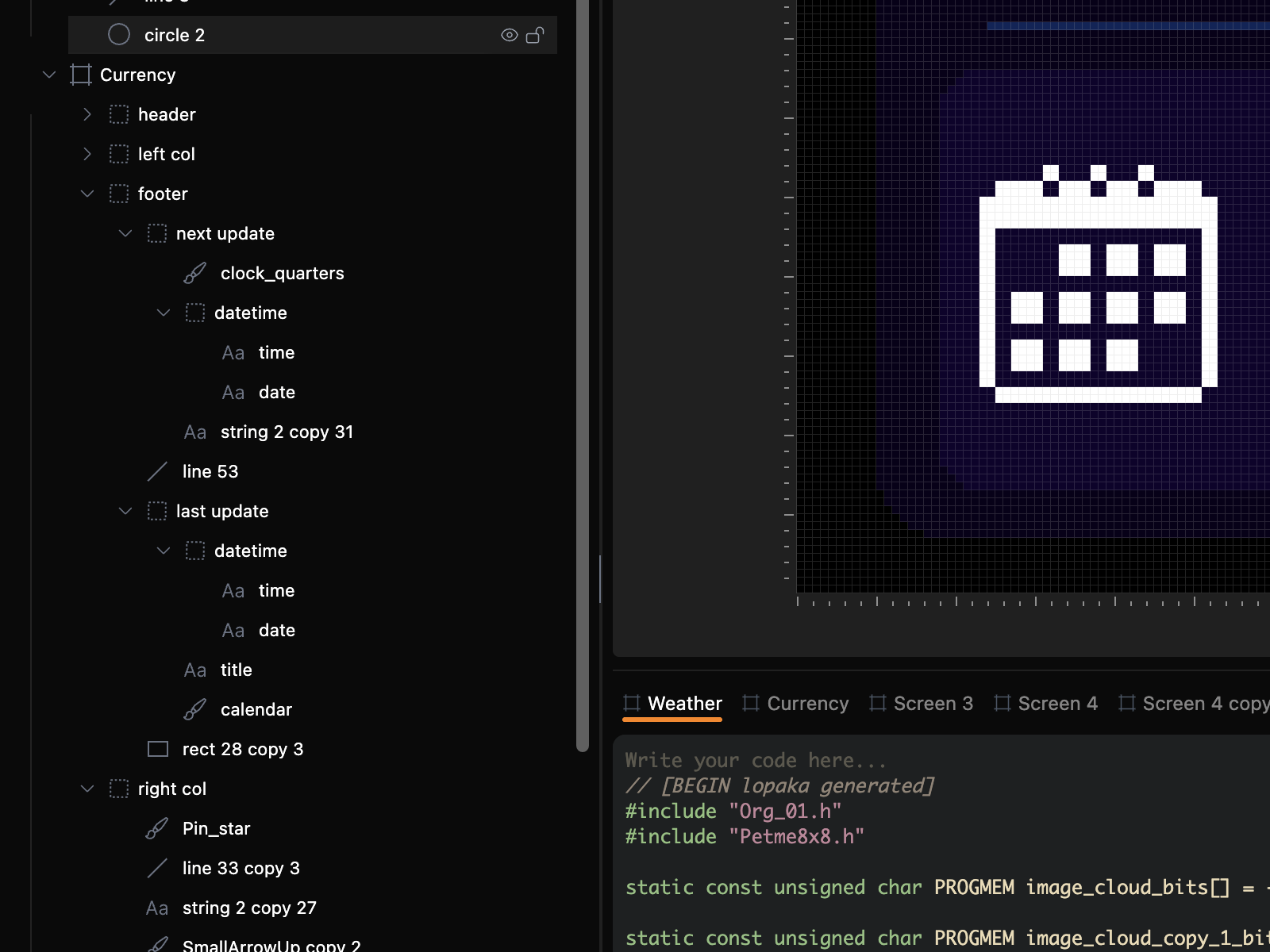
A few things you can do:
- Nest groups: Put groups inside other groups to organize complex screens.
- Move entire groups: Drag a group into another group, even across different levels.
- Select and edit: Click to select a whole group, or double-click to work with an individual layer.
- Hide or lock: Control everything inside a group at once.
You can also rename layers, groups, and screens directly in the Layers panel.
Better image exports for your firmware
Lopaka can now export images as separate files, ready to use in your firmware project.
Open Code Settings to find the images used on your screen. Download them individually or enable Include image files to reference them from the generated code.
You can choose how to handle image data:
- Inline: Keep image data inside the generated source code.
- Separate files: Download image assets and include them in your project.
- External declarations: Reference image data you've already defined elsewhere.
The exported format depends on your platform:
- Adafruit GFX, Arduino GFX, TFT_eSPI, U8g2, Flipper Zero: C/C++ header files
- LVGL: C image files
- CircuitPython: BMP
- MicroPython: PBM
- ESPHome: PNG
This is handy when you want to keep graphics separate from your application code or reuse the same image across multiple screens.
Paint Fill tool
The Paint tool now has Fill.
Select a Paint layer, choose Fill, pick a color, and click inside an area. Lopaka fills the connected pixels without changing the surrounding artwork.
It works with both monochrome and color images. You can fill empty areas inside a shape or recolor existing pixels.
This makes drawing icons, simple illustrations, and pixel art much less tedious.
A more flexible editor
We've made a few changes to give you more control over the workspace.
Resizable panels
Drag the edge of the Layers panel to change its width, or resize the Code panel vertically. Double-click a panel's resize handle to collapse or expand it.
Lopaka remembers your preferred panel sizes.
Easier screen navigation
Working with multiple screens is more convenient now:
- Click a screen on the canvas or in the Layers panel to open its code.
- Click a code tab to select that screen and focus the canvas on it.
- Code tabs wrap onto multiple rows when you have lots of screens.
You can also copy artwork from one screen and paste it directly into another.
Invite friends and get free Plus
We've launched a referral program.
Open Invite a friend or Get a free Plus from the navigation bar to get your personal invitation link.
When a friend signs up through your link and makes their first purchase:
- You get 7 days of Plus for free.
- Your friend gets 7 extra days of Plus with their first weekly, monthly, or annual purchase.
- If they choose Lifetime, they get 10% off instead.
Each paying friend earns you another week. If you already have Plus, your bonus days are added after your paid access.
You can see your referrals and earned rewards in the invitation dialog.
More flexibility with Basic projects
We've also changed how the free Basic plan handles projects.
Previously, Basic had a limit of two cloud projects. Now there's no separate project count limit. Instead, you get three screens total across your projects.
You can keep three small projects with one screen each, or put all three screens into a single project.
The idea is to let you organize your work by project instead of having a separate project quota.
A few more drawing improvements
Ellipses for Adafruit GFX
You can now draw filled or outlined ellipses in both color and monochrome Adafruit GFX projects. Lopaka also supports importing them from existing code. Generated ellipse code requires Adafruit GFX 1.12.2 or newer.
Animation colors
The animation frame editor now lets you choose a drawing color on supported platforms. You can use the platform's palette while editing individual frames.
Right-click eraser
When working with a Paint layer, right-click and drag to erase pixels without switching tools.