
Lopaka Basics 07: Animations
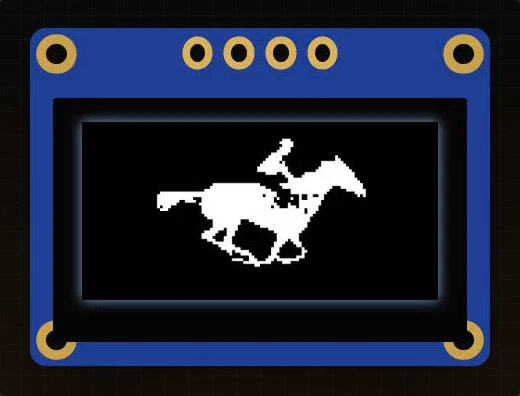
This horse was photographed in 1887. Now it is a GIF, galloping on a tiny Arduino screen: fifteen frames, and they fit. Make it full screen and a little smoother, and the sketch no longer fits at all.
In this episode you will find out how animation works on a small screen and how much memory it needs. Then you will turn a GIF into code in Lopaka, run it on a simulated Arduino UNO, and put a whole month of moon phases on an ESP32.
What you will build: a galloping horse from a GIF on a 128×64 OLED with an Arduino UNO, and a month of moon phases from a video on the same OLED with an ESP32. What you need: a browser and the simulator setup from episode 1: an SSD1306 OLED and the U8g2 library. For the horse we used Eadweard Muybridge's galloping horse (Animal Locomotion, 1887, public domain); any short GIF works.
Frames and frame rate
An animation is a stack of pictures
An animation is a stack of still pictures. Show them one after another, fast enough, and your eye stops seeing pictures and starts seeing motion.
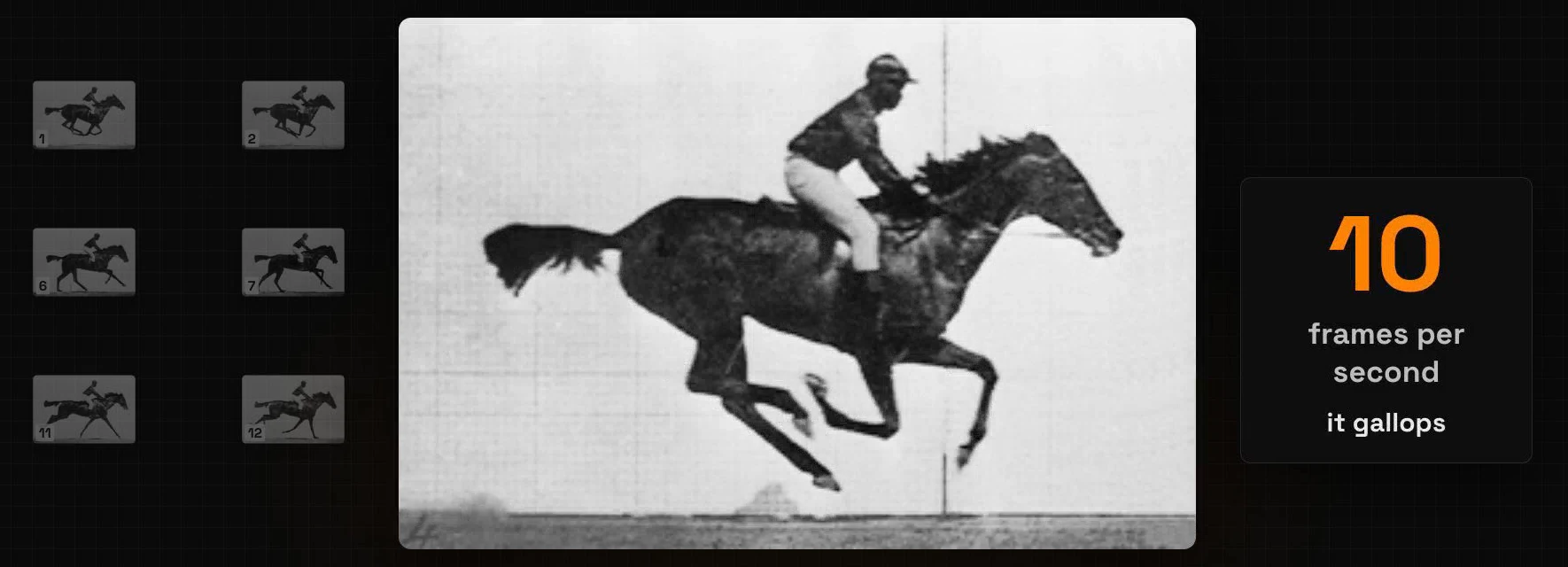
That speed is the frame rate, in frames per second (FPS). At two frames per second the horse is a slideshow. At ten, it gallops.
The loop plays it frame by frame
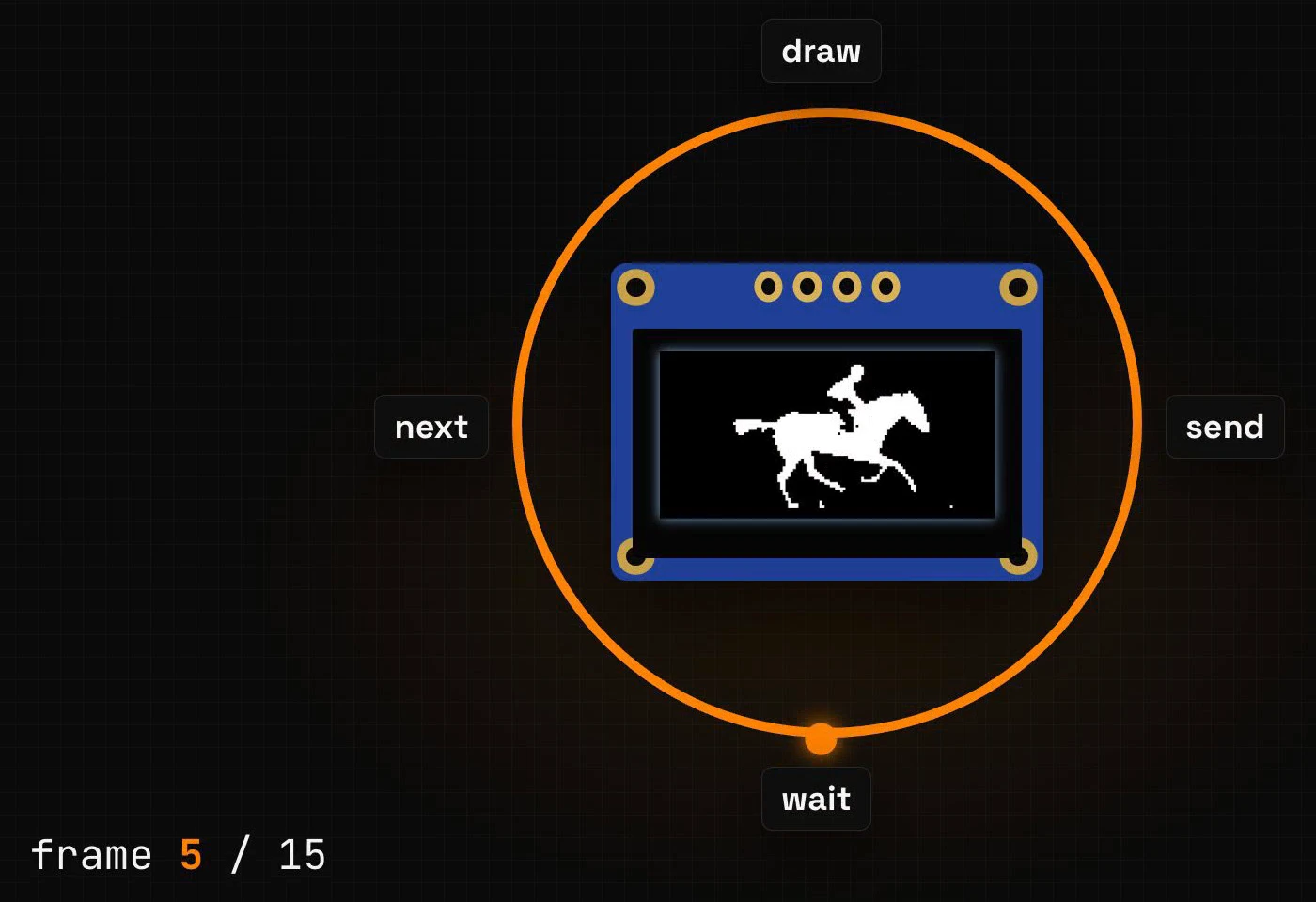
A microcontroller plays an animation the same way. Each pass of loop() draws the current frame, sends it to the screen, waits a moment and moves on to the next frame. After the last frame it jumps back to the first.
Every frame costs memory
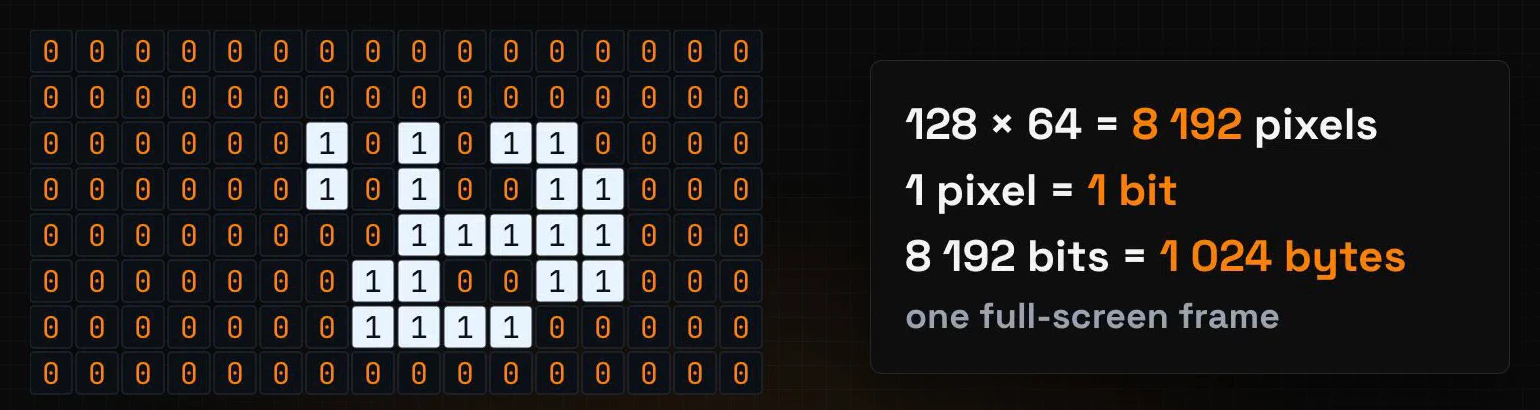
One full-screen frame is 1,024 bytes
The OLED has 128 by 64 pixels, and each pixel is one bit: on or off. That is 8,192 bits, or 1,024 bytes for one full-screen frame. A frame of any size takes width × height ÷ 8 bytes.
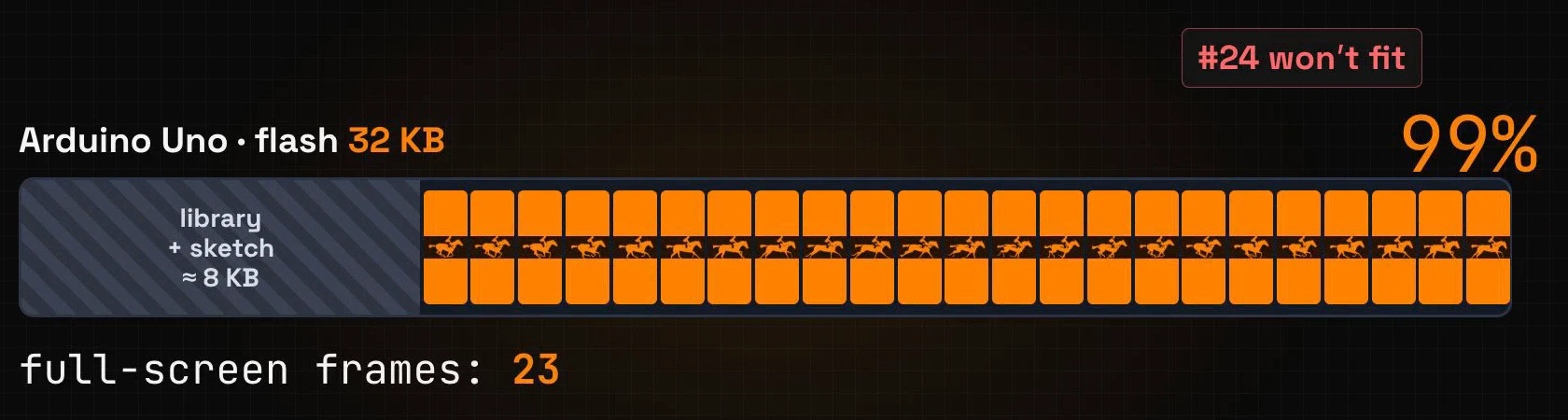
An Arduino UNO holds 23 full-screen frames
The frames live in flash memory, next to your program. An Arduino UNO has 32 KB of flash, and the U8g2 library and the sketch already take about 8 KB of it. That leaves room for 23 full-screen frames. We checked with the compiler: with 23 frames the sketch uses 99% of the UNO's flash, and the 24th frame makes it too big.
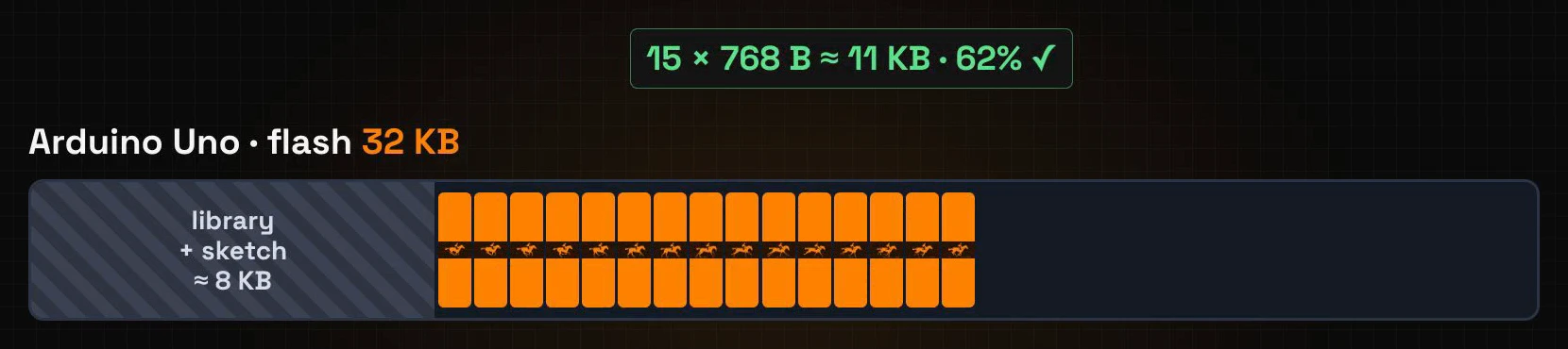
Why the horse fits, and full screen does not
The horse is 96 by 64 pixels, so a frame takes 96 × 64 ÷ 8 = 768 bytes. Fifteen frames come to about 11 KB, and the sketch fits in 62% of the flash.
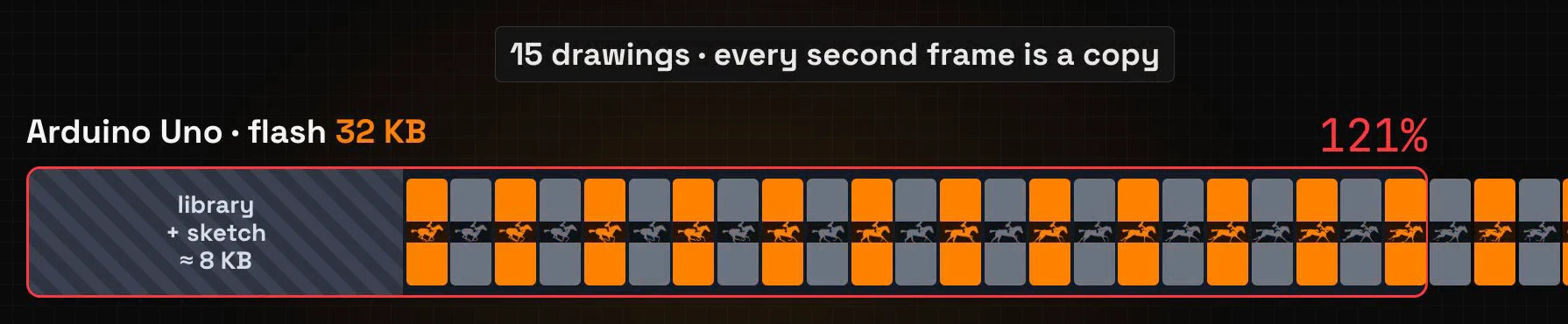
Full screen at twenty frames per second needs thirty frames of 1,024 bytes, and the sketch grows to 121% of the flash. The compiler stops with "Sketch too big". But the GIF has only fifteen drawings. To play it at twenty frames per second, the sketch shows every drawing twice, so half of those thirty frames are copies.
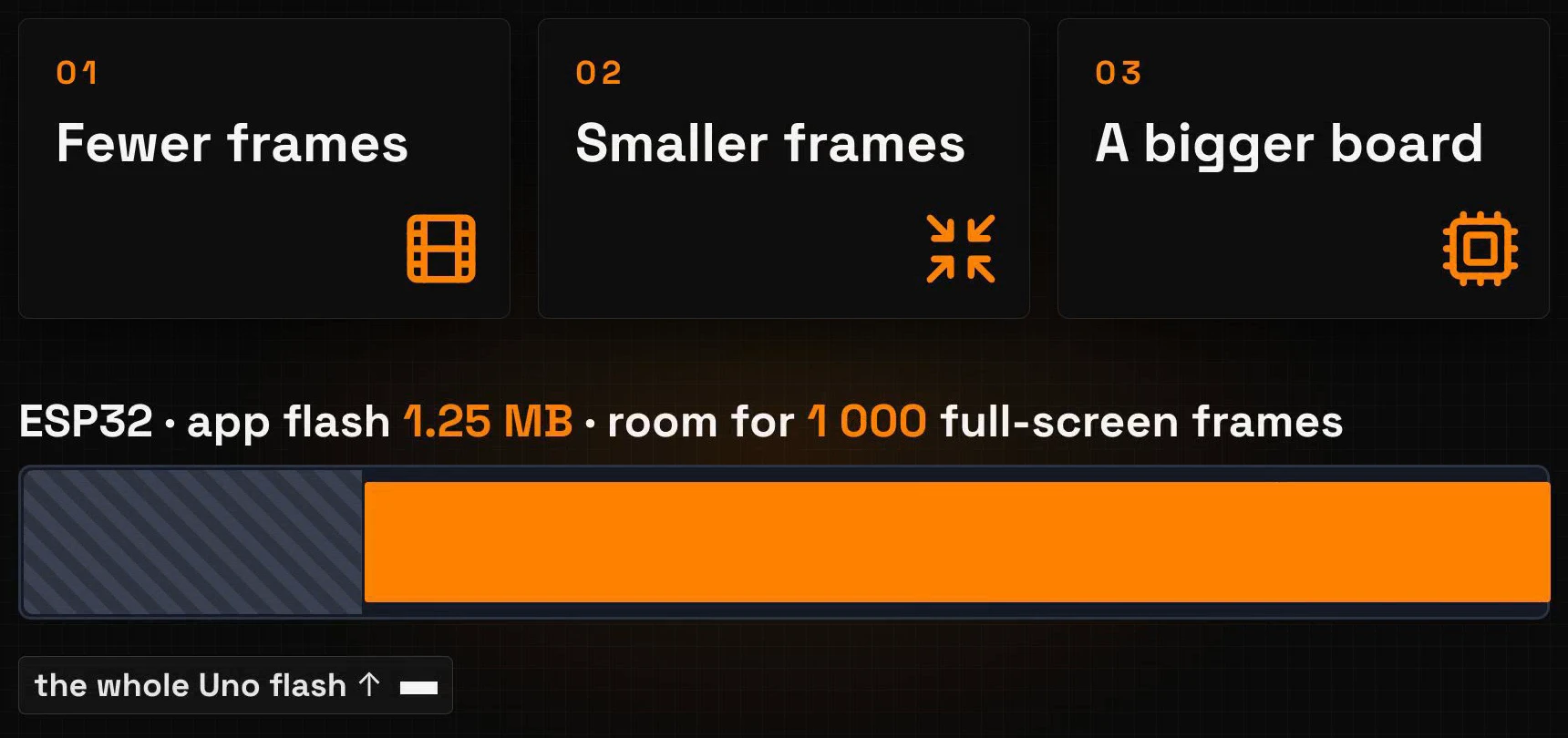
Three ways to make an animation fit
- Fewer frames. Keep the GIF's own frame rate: a higher one only adds copies.
- Smaller frames. Every row and column you cut saves bytes in every frame.
- A bigger board. An ESP32 has 1.25 MB of flash for your program: room for about a thousand full-screen frames.
Step 1: import a GIF
Create a new project as in episode 1: + New Project, platform U8g2, screen size 128×64.
The animation library
Open the Animations tab on the left. Lopaka comes with ready-made animated icons, and the size estimate sits next to the size and quality buttons. A 64×64 icon in High quality takes about 14 KB; at 32×32 and Low quality it is under one kilobyte. Pick an icon there when a small animation is all you need.
Upload your GIF
For your own GIF, click Upload at the top of the panel and drop the file into the dialog. Videos work too, as you will see in step 5.
Lopaka splits the GIF into frames and opens the import dialog. The frames are on the left, the preview in the middle, the settings on the right:
- Dithering: switch it from Floyd-Steinberg to No dithering. The photo turns into a clean white silhouette instead of a cloud of dots. Dithering helps with shades, as in episode 2; a silhouette needs none.
- Frames per second: keep 10, the GIF's own speed.
The row at the bottom does the memory maths for you: 15 source frames, 15 output frames, frame size 96×64, about 11.3 KiB. Lopaka scaled the 300×200 GIF to the height of the screen, 64 pixels, which makes it 96 pixels wide. One frame is 768 bytes, the number at the top of the settings.
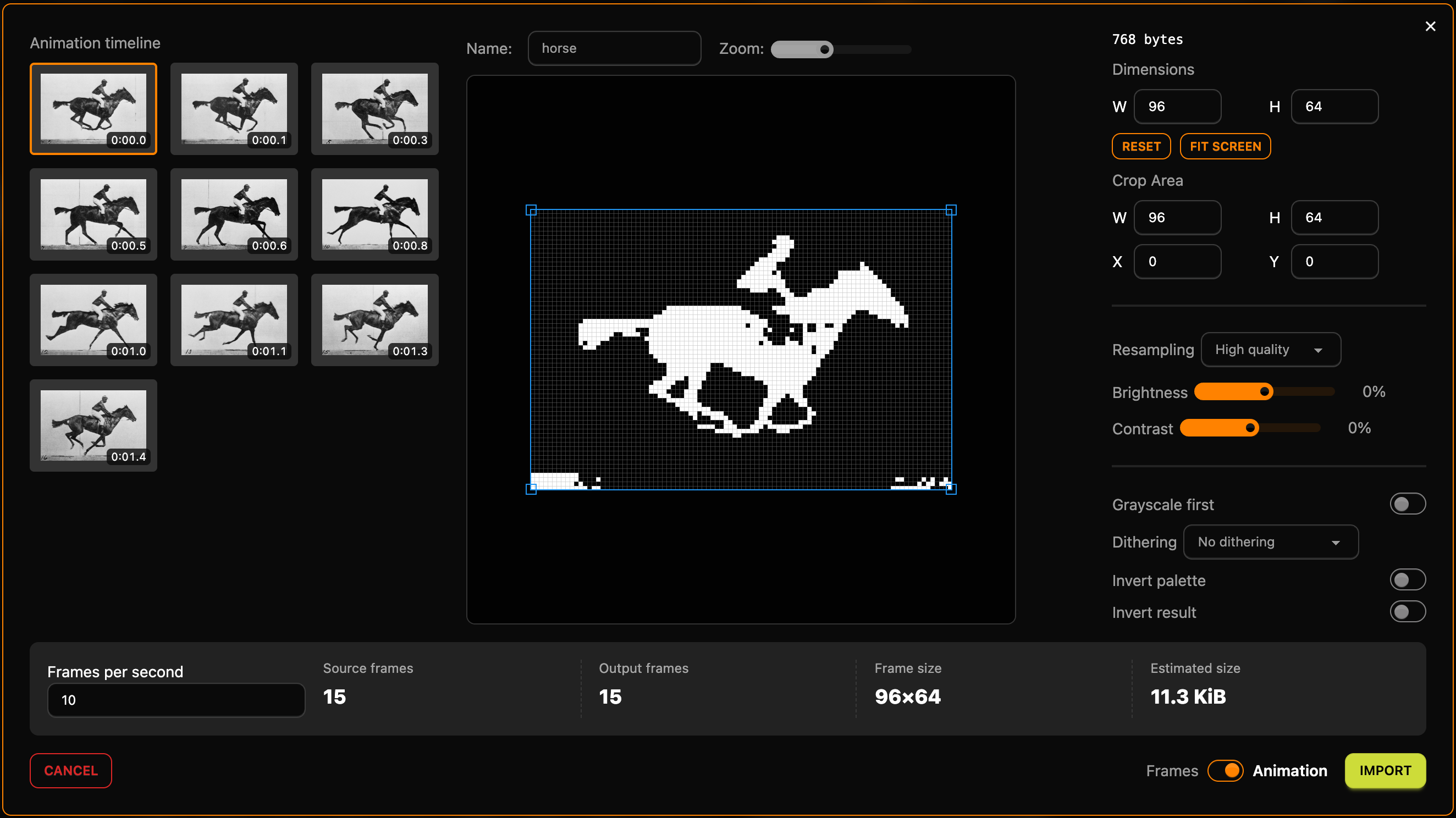
A common mistake is to raise the frame rate to make the GIF smoother. At 20 FPS the dialog shows 15 source frames but 30 output frames, and the estimate doubles to 22.5 KiB: the same fifteen drawings, each one twice.
Click Import.
Step 2: the frame editor
The frames open in the frame editor, with all fifteen in the timeline at the bottom.
- Play (the triangle button) checks the loop.
- With the Onion switch on, the previous frame shows through in grey, so you can see how far the legs move from one frame to the next.
The old photos have numbers along the bottom edge, and the import turned them into white marks. Remove them from all frames at once: click the frame size next to the frame rate (96×64 px), set Height to 60 and click Resize. The pixels stay anchored to the top-left corner, so the bottom four rows go away on every frame, and the memory counter drops from 11.3 to 10.6 KiB. If a frame still has a few dots of a number at the bottom edge, step to it and wipe them with the eraser.
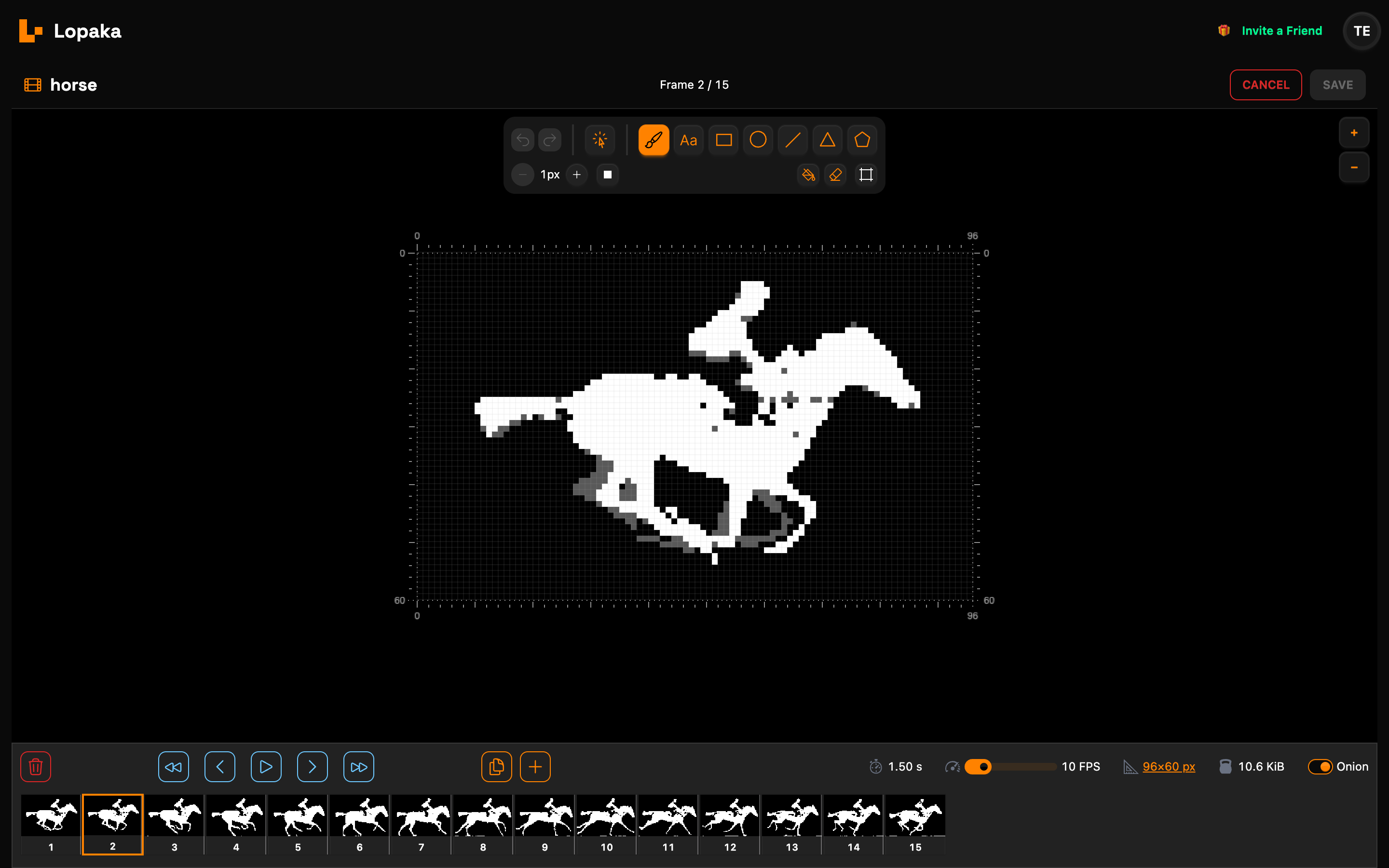
Click Save. The animation sits on the screen like any other layer, named horse, at X 16 and Y 0: (128 − 96) ÷ 2 = 16 puts it in the middle.
Step 3: the code
Frames straight into the code
In the switches next to the code, untick Animation helpers. Now Lopaka writes the frames straight into the code, and your own loop() decides when to draw them:
// [BEGIN lopaka generated]
static const unsigned char animation_horse_frames[15][720] U8X8_PROGMEM = {
  {0x00,0x00,0x00, /* ... */ 0x00,0x00},   // frame 1: 720 bytes, shortened here
  // ... 13 more frames ...
  {0x00,0x00,0x00, /* ... */ 0xff,0xff}    // frame 15
};
static int animation_horse_frame = 0;
void drawScreen_1(void) {
    u8g2.setFontMode(1);
    u8g2.setBitmapMode(1);
    // horse
    u8g2.drawXBMP(16, 0, 96, 60, animation_horse_frames[animation_horse_frame]);
    animation_horse_frame = (animation_horse_frame + 1) % 15;
}
// [END lopaka generated]
What the numbers mean:
[15][720]: one array of fifteen frames, 720 bytes each. A row of 96 pixels takes 96 ÷ 8 = 12 bytes, and 60 rows make 720. In total that is 10,800 bytes, the 10.6 KiB from the frame editor.U8X8_PROGMEMkeeps the frames in flash, as with the images in episode 2. Without it, an UNO would try to copy them into its 2 KB of RAM.drawXBMP(16, 0, 96, 60, ...)draws the current frame at the position and size of the layer.(animation_horse_frame + 1) % 15steps to the next frame.% 15is the remainder after dividing by 15, so after frame 14 (the fifteenth, counting from zero) the counter jumps back to 0.
The rest of the sketch
Around the generated block, write the rest of the sketch. You can type it in Lopaka's code panel: lines above // [BEGIN lopaka generated] and below // [END lopaka generated] are yours, they stay in the project when you change the design, and Copy takes them along.
#include <U8g2lib.h>

U8G2_SSD1306_128X64_NONAME_F_HW_I2C u8g2(U8G2_R0, U8X8_PIN_NONE);

// Paste the Lopaka code here

void setup() {
  u8g2.begin();
}

void loop() {
  u8g2.clearBuffer();
  drawScreen_1();
  u8g2.sendBuffer();
  delay(56);
}
Each pass of loop() is one frame: clear, draw, send, wait. This is the loop from the beginning of the article.
![The code panel in Lopaka with the include and the display above the generated block, the frames array animation_horse_frames[15][720] U8X8_PROGMEM, the draw function, and setup and loop with delay(56) below; Animation helpers is unticked](/pages/blog/assets/2026-11-03/animation-code.png)
Why the delay is 56 milliseconds
Sending a full frame to the OLED over I2C takes about 44 milliseconds on the simulated UNO. Add a 56-millisecond delay, and every frame takes 100 milliseconds: ten frames per second, the speed of the GIF. On a real board the time to send a frame depends on the I2C speed; if the horse runs too fast or too slow, change the delay.
Click Copy.
Step 4: run it on an Arduino UNO
Open your simulator project from episode 1: an Arduino UNO and an SSD1306 OLED wired to GND, 5V, A5 (SCL) and A4 (SDA), with the U8g2 library. Paste the code into sketch.ino and press Play.
The horse gallops. Compiled for an UNO, the sketch reports:
Sketch uses 19324 bytes (59%) of program storage space. Maximum is 32256 bytes.
Global variables use 1558 bytes (76%) of dynamic memory, leaving 490 bytes for local variables. Maximum is 2048 bytes.
That is 59% of the flash, down from 62% before we cut the four rows. As in episode 1, most of the RAM is the 1,024-byte frame buffer.
Step 5: a video on an ESP32
Import the video
Lopaka also imports video (MP4, MOV and WebM). We used a NASA Scientific Visualization Studio clip that shows a whole month of moon phases in ten seconds.
Create another U8g2 project at 128×64, open Animations and click Upload. The import dialog for a video does the maths while you change the settings:
- At the video's 30 frames per second, ten seconds make 300 frames at 64×64: 150 KiB.
- A slow moon looks fine at 12 frames per second: type
12, and it becomes 120 frames, 60 KiB. - Turn on Invert result. Lopaka lights the dark parts of a picture, which is why the dark horse on a light background came out white. The moon is the opposite, bright on a dark sky, so invert the result: now the moon lights up and the sky stays dark.
Keep Floyd-Steinberg dithering this time: the dots draw the shading of the moon's surface.
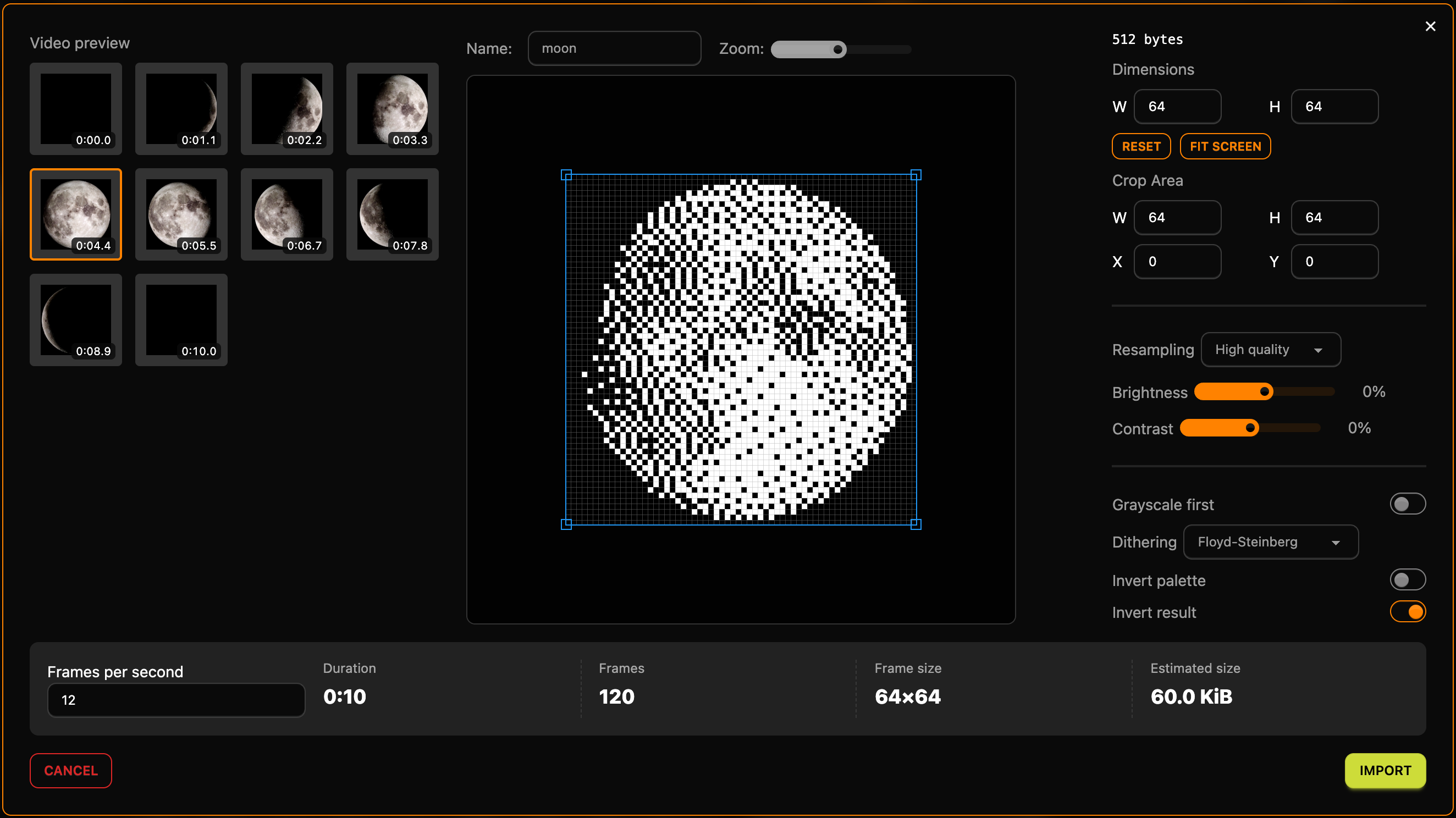
Click Import, then Save in the frame editor. Lopaka centres the 64×64 animation on the screen, at X 32. Untick Animation helpers again, and the code gets animation_moon_frames[120][512] and the line animation_moon_frame = (animation_moon_frame + 1) % 120;.
60 KB: twice the UNO, under 5% of an ESP32
At 64 by 64 pixels each frame is 64 × 64 ÷ 8 = 512 bytes, so 120 frames take 61,440 bytes, 60 KB. That is about twice the UNO's whole flash.
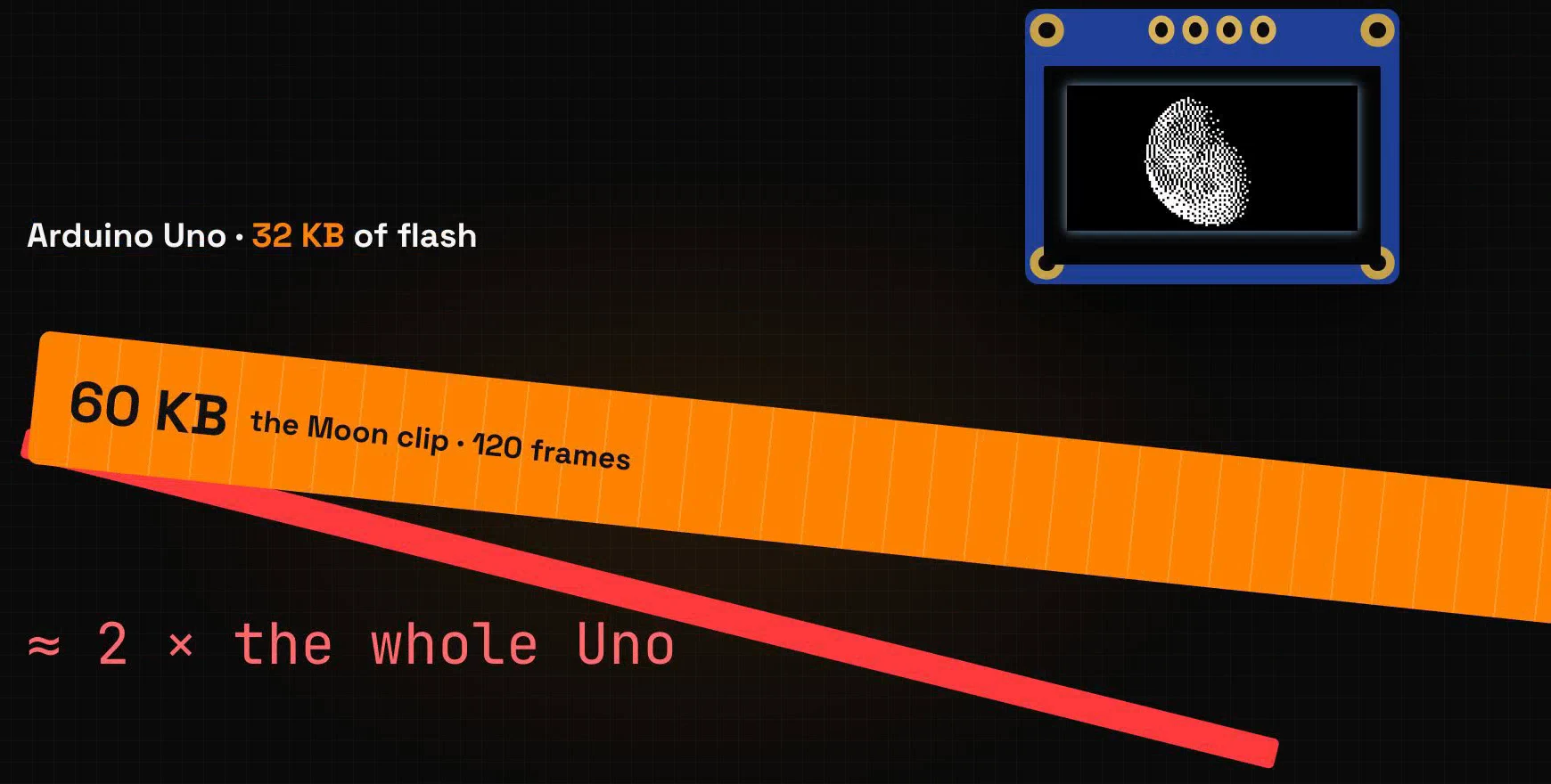
An ESP32 has 1,310,720 bytes of flash for the program, and the same clip takes 4.7% of it.
Run it on the ESP32
Use the same sketch with the moon's code in its place, and change the delay to delay(32);. The ESP32 sends a frame in about 51 milliseconds in the simulator, so each frame takes about 83 milliseconds: 12 frames per second.
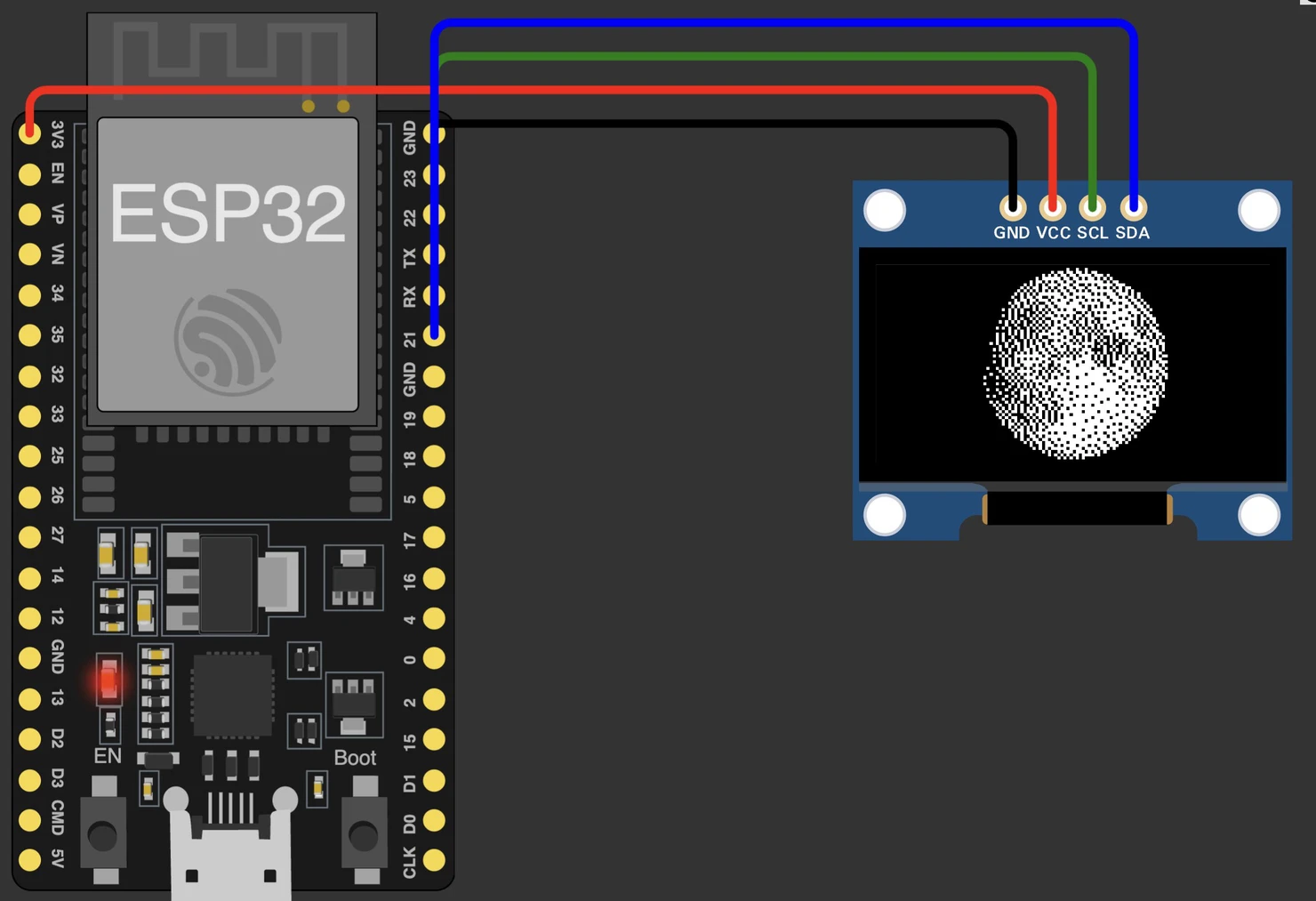
In the simulator, create an ESP32 project, add the SSD1306 OLED and the U8g2 library, and wire the display to the ESP32's I2C pins: GND to GND, VCC to 3V3, SCL to GPIO 22 and SDA to GPIO 21. Paste the sketch and press Play. The compiler reports 352,240 bytes, 26% of the flash, and the moon grows and shrinks through a whole month.
Recap
- An animation is a stack of frames, shown fast enough to look like motion. Each pass of
loop()clears, draws one frame, sends it and waits. - Every frame costs width × height ÷ 8 bytes of flash. A full-screen frame on this OLED is a kilobyte, and an UNO holds about twenty of them.
- To make a GIF fit, use fewer frames, smaller frames or a bigger board.
Next episode: Touch UI with LVGL. Touch screens, with buttons and sliders, like on a phone. Read episode 8.
Ready to try? Open Lopaka and bring your own GIF to life.